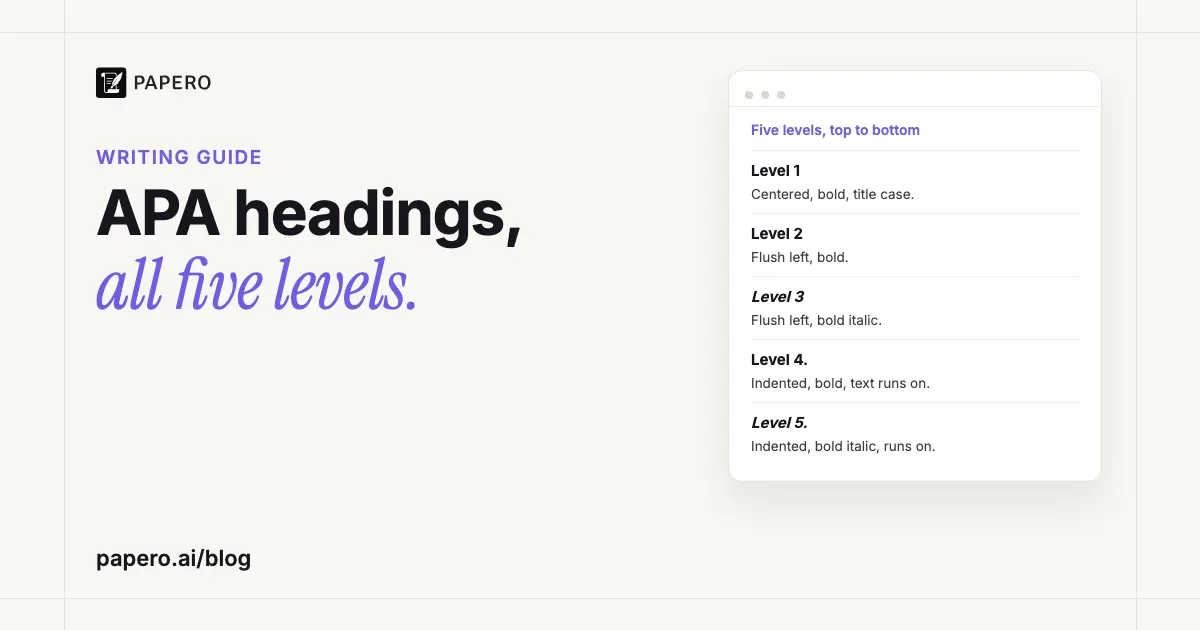
APA Style has five levels of heading, and every one of them is bold and in title case. Level 1 is centered, Levels 2 and 3 sit flush left (Level 3 is also italic), and Levels 4 and 5 are indented, end with a period and run straight into the paragraph. Use the levels in order, starting at Level 1, and only as many as the paper needs.
Key Takeaways
- Level 1: centered, bold. Level 2: flush left, bold. Level 3: flush left, bold italic. All three put the text in a new paragraph below.
- Levels 4 and 5 are indented like a paragraph, end with a period, and the text continues on the same line. Level 5 is bold italic.
- Do not start with an “Introduction” heading. The paper title, repeated on the first page of text, does that job.
- Avoid a single subsection: open a level with two headings or none.
- No numbers or letters before headings, and no blank lines above or below them.
The five APA heading levels at a glance
APA 7 headings differ by alignment and by italics. Every level is bold and in title case, which capitalizes most words. The first three levels stand on their own line; the last two are run-in headings that start the paragraph. This table follows APA’s own headings page and its Student Paper Setup Guide.
| Level | Format | Where the text starts |
|---|---|---|
| 1 | Centered, bold, title case | New paragraph below |
| 2 | Flush left, bold, title case | New paragraph below |
| 3 | Flush left, bold italic, title case | New paragraph below |
| 4 | Indented 0.5 in., bold, title case, ends with a period | Same line, after the heading |
| 5 | Indented 0.5 in., bold italic, title case, ends with a period | Same line, after the heading |
A quick way to remember it: bold is constant, and italics mark Levels 3 and 5. APA’s setup guide asks for the same font throughout the entire paper, so keep headings in the font and size of your body text. They are double-spaced like everything else in the paper.
APA headings example
Here is how a short empirical paper uses the levels. The study is invented for the example; the headings are the point. The right-hand column says how each line is formatted, because a web page cannot reproduce the alignment of a manuscript.
| Heading as it appears in the paper | Level | Format |
|---|---|---|
| Sleep and Exam Performance in First-Year Students | Paper title | Centered, bold (acts as Level 1) |
| Sleep Duration in University Students | 2 | Flush left, bold |
| Sleep and Memory Consolidation | 2 | Flush left, bold |
| Method | 1 | Centered, bold |
| Participants | 2 | Flush left, bold |
| Measures | 2 | Flush left, bold |
| Sleep Diaries | 3 | Flush left, bold italic |
| Weeknight Entries. Participants logged bedtime and wake time each weeknight… | 4 | Indented, bold, run-in |
| Weekend Entries. On Saturdays and Sundays, the diary asked… | 4 | Indented, bold, run-in |
| Nights Before an Exam. Entries for these nights also recorded… | 5 | Indented, bold italic, run-in |
| Other Nights. For the remaining weekend nights… | 5 | Indented, bold italic, run-in |
| Exam Scores | 3 | Flush left, bold italic |
| Results | 1 | Centered, bold |
| Discussion | 1 | Centered, bold |
| References | Section label | Centered, bold, new page |
Notice three things. The introduction has no heading of its own, yet it holds two Level 2 subsections, which APA allows. Method, Results and Discussion are all Level 1 even though only Method goes deeper; each main section starts at the top level whatever happens below it. And every level that opens, opens twice: two Level 2 headings under Method, two Level 3 headings under Measures, two Level 4 headings under Sleep Diaries, two Level 5 headings under Weekend Entries. For Level 1 and Level 2 headings at work in a complete student paper, with its title page and references, see our APA sample paper.
“References” is a section label rather than a heading, but it looks the same as Level 1: bold and centered, at the top of a new page. The same goes for “Abstract” if your paper has one. If the reference page itself is giving you trouble, our guide to the hanging indent in Word and Google Docs covers the one layout setting it needs, and our APA reference page guide covers what goes in each entry.
How many heading levels does an APA paper need?
As many as the content has distinct parts, and no more. APA’s heading template says three levels is average. Use the levels strictly in order: a paper with one level uses Level 1, a paper with two uses Levels 1 and 2. Short student papers may not need any headings at all.
The rule that trips people up is the single subsection. APA compares headings to an outline: a section numbered I is divided into at least an A and a B, or not divided at all. So if Method has a “Participants” heading, it needs a second Level 2 heading beside it, or no Level 2 headings at all.
Sections of equal importance take the same level. In a paper that reports two experiments, the Method and Results headings for Experiment 1 sit at the same level as those for Experiment 2, with parallel wording. Wording matters too: “Sleep Diaries” tells a reader more than “Measure A”, and APA asks for headings that are both descriptive and concise. Headings also stay free of abbreviations unless the text has already defined them.
Do you use an “Introduction” heading in APA?
No. APA assumes the first paragraphs of a paper are the introduction, so the label adds nothing. The paper title, repeated in bold and centered at the top of the first page of text, acts as a de facto Level 1 heading. Subsections inside the introduction start at Level 2, and the next main section, such as Method, takes Level 1.
The one exception is an instructor who asks for the label. APA’s setup guide says plainly that instructors’ guidelines take precedence over APA Style, so a rubric that lists an “Introduction” heading wins. Without that instruction, leave it out.
Essays that are not empirical skip the Introduction label too. A literature review or an argumentative paper has no Method or Results, so its Level 1 headings name the themes instead. If you planned the paper with an outline, the outline’s main points usually become the Level 1 headings; our argumentative essay outline shows that structure, and the literature review example organizes its sections by theme. An empirical paper’s outline maps straight onto Method, Results and Discussion, as our research paper outline shows.
How do you set up APA headings in Word and Google Docs?
Format each level once as a heading style, then apply the style instead of bolding text by hand. APA recommends this because styles keep every level consistent and tag the headings correctly for screen readers and navigation tools. In Word, change Heading 1 to centered and bold, Heading 2 to flush left and bold, and Heading 3 to bold italic.
In Word: on the Home tab, right-click Heading 1 in the Styles gallery and choose Modify. Set the font to match your body text, the color to black, bold on, alignment centered, and the spacing to double with no space before or after. Repeat for Heading 2 (left-aligned) and Heading 3 (left-aligned, bold italic). Microsoft’s alternative is to format one heading by hand, then right-click the style and choose Update Heading 1 to Match Selection.
Levels 4 and 5: these share a line with the paragraph, so APA suggests typing the heading and a few words of the text that follows, then highlighting only the heading and applying the style. Only the highlighted words take the heading format. Indent the paragraph’s first line 0.5 in., as for any other paragraph.
In Google Docs: format one heading the way you want it, then go to Format > Paragraph styles > Heading 1 > Update “Heading 1” to match. Every Heading 1 in the document follows. Under Format > Paragraph styles > Options, “Save as my default styles” keeps the setup for your next paper.
For page-level settings that sit around the headings, such as the title page and page numbers, the glossary’s APA format entry lists each rule. Page 1 itself is set out line by line in our APA title page guide.
Common mistakes with APA headings
Most heading errors come from habits that other styles or school templates allow. APA notes that its heading guidance was revised from the 6th edition, so older handouts can mislead too. These are the slips APA’s own pages warn about or that its format table rules out:
- Numbering the headings. “1. Method” or “A. Participants” is not APA. Headings carry no numbers or letters.
- Adding blank lines. No extra space above or below a heading, even when one falls at the bottom of a page. Double spacing already separates it.
- Making headings bigger. APA asks for the same font throughout the paper, and its format table marks levels with bold, italics and alignment instead.
- Skipping a level. A Level 3 heading belongs under a Level 2, never straight under a Level 1.
Write every heading in title case, never all capitals or sentence case, and remember that Levels 4 and 5 end with a period while the first three levels never do.
One point is easy to confuse: a heading is not the same thing as the header. The header is the strip at the top of every page that holds the page number. APA’s setup guide says student papers do not need a running head on any page, and our glossary entry on the running head explains who does. MLA works differently: its header carries your surname and the page number, as our guide to the MLA heading and header shows.
Where Papero fits
Papero is an AI writing workspace for students and researchers. Its outline builder starts a paper from a standard IMRaD structure, from headings it suggests for your topic, or with no headings at all, and each section comes with its own prompt. Citations are formatted in nine styles, including APA 7.
When your document uses APA 7 and you export it to Word in the double-spaced manuscript layout, Papero formats the headings for you: they come out as APA’s levels, counted from the top level your paper uses, with Level 1 centered and bold, Level 2 flush left and bold, Level 3 flush left in bold italic, Level 4 indented and bold, and Level 5 indented in bold italic. The export dialog switches the title page on for an APA paper, the title is repeated at the top of the first page of text, and when the paper cites sources, “References” starts a new page, centered and bold. With page numbers on, the dialog’s default, the number sits at the top right of every page, the title page included. The dialog picks US Letter or A4 from your browser’s language region, and you can change it in page setup.
One step stays with you. Papero sets Level 4 and 5 headings on a line of their own, so in Word, join each one to the start of the paragraph after it and end it with a period, the way APA’s format table shows.
For the citations that fill those sections, our guide to APA in-text citation covers the rules. The research paper writing page shows the whole workflow, and you can sign up free.
Frequently Asked Questions
How many levels of headings are there in APA 7?
There are five. Level 1 is centered and bold, Level 2 is flush left and bold, Level 3 is flush left and bold italic, and Levels 4 and 5 are indented run-in headings that end with a period (Level 4 bold, Level 5 bold italic). All five use title case.
Are APA headings bold?
Yes, all of them. APA 7 makes every heading level bold, and adds italics to Levels 3 and 5. The “References” and “Abstract” labels are bold and centered too. Body text stays in regular type, and APA asks for the same font throughout the paper, headings included.
Do APA headings end with a period?
Only Levels 4 and 5 do. They are indented, end with a period, and the paragraph text continues on the same line after them. Levels 1, 2 and 3 have no period and sit on their own line, with the text starting as a new paragraph below.
Does a short APA essay need headings?
Not necessarily. APA says short student papers may not require any headings. Use them when a paper has distinct parts a reader needs to find, such as Method and Results in a research report, and always start with Level 1. A two-page reflection usually reads better without them.
Can you number headings in APA format?
No. APA headings carry no numbers or letters, so “Method” is right and “2. Method” is not. The levels show the structure through alignment, bold and italics instead. If your instructor asks for numbered sections, their guidelines take precedence over APA Style.
Sources
- American Psychological Association, “Headings” (Style and Grammar Guidelines, last updated July 2022; read from the Internet Archive copy of October 12, 2026, because apastyle.apa.org blocks automated requests): https://apastyle.apa.org/style-grammar-guidelines/paper-format/headings
- American Psychological Association, Heading Levels Template: Student Paper (2022, last updated March 21, 2022): https://apastyle.apa.org/instructional-aids/heading-template-student-paper.pdf
- American Psychological Association, Student Paper Setup Guide, 7th edition (last updated October 8, 2025): https://apastyle.apa.org/instructional-aids/student-paper-setup-guide.pdf
- American Psychological Association, Abstract and Keywords Guide (read from the Internet Archive copy of September 3, 2026): https://apastyle.apa.org/instructional-aids/abstract-keywords-guide.pdf
- Microsoft Support, “Customize or create new styles” (support.microsoft.com, accessed October 2026): https://support.microsoft.com/en-us/office/customize-or-create-new-styles-d38d6e47-f6fc-48eb-a607-1eb120dec563
- Google Docs Editors Help, “Add a title, heading, or table of contents in a document” (support.google.com, accessed October 2026): https://support.google.com/docs/answer/116338