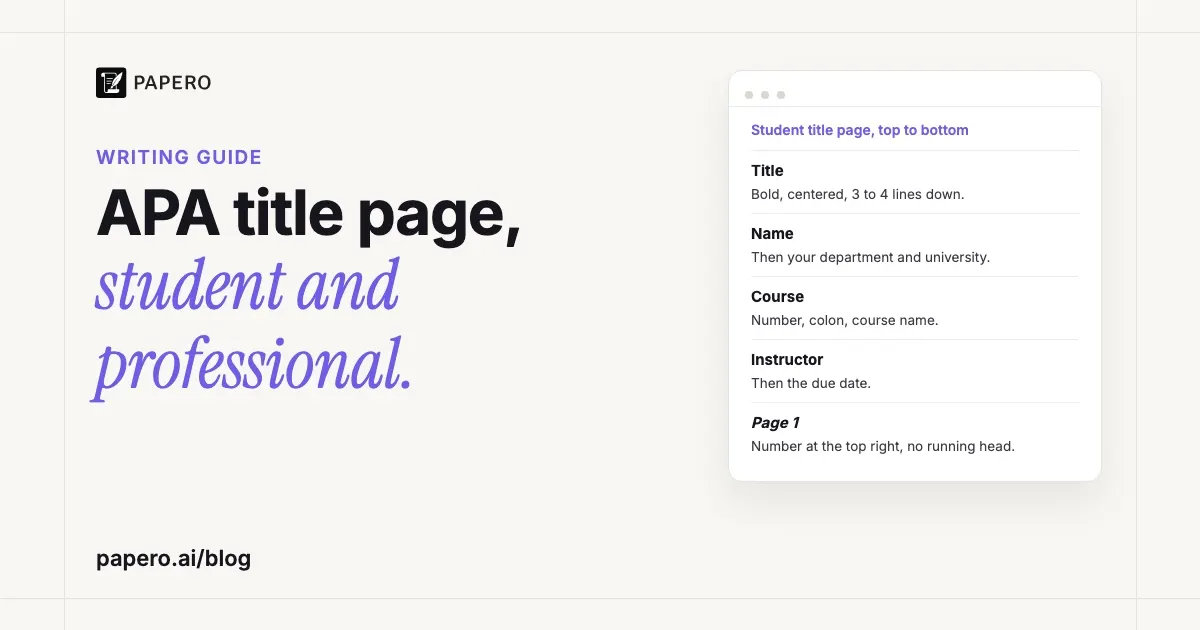
An APA title page is the first page of the paper. A student version lists six things, centered and double-spaced in the upper half of the page: the title in bold, your name, your department and university, the course number and name, your instructor, and the due date. The page number 1 sits at the top right. Student papers have no running head unless your instructor asks for one.
Key Takeaways
- APA 7 has two versions: a student title page (course, instructor, due date) and a professional one (author note, running head). Students use the student version unless told otherwise.
- Start the title three to four lines down from the top, centered, bold and in title case. Leave one blank double-spaced line under it, and none between the other lines.
- Everything else on a student title page is plain text: no bold, italics, larger font or extra spacing.
- The page number goes in the header at the top right, starting at 1 on the title page itself.
- A “cover page” in APA is the same page under another name. APA lists only text elements, so it has no images, borders or logos.
APA title page format at a glance
APA’s Title Page Setup guidance lists the elements in a fixed order, each centered on its own double-spaced line. The two versions share the title, the names and the affiliation, then split: a student paper adds course details, a professional paper adds an author note and a running head. The table shows both.
| Element | Student paper | Professional paper |
|---|---|---|
| Paper title, bold, 3-4 lines down | Yes | Yes |
| Author name(s) | Yes | Yes |
| Affiliation | Department, university you attend | Department, institution where the research was done |
| Course number and name | Yes | No |
| Instructor name | Yes | No |
| Assignment due date | Yes | No |
| Author note | No | Yes, bottom half of the page |
| Running head | Only if your instructor asks | Yes, on every page |
| Page number 1, top right | Yes | Yes |
The rest of the page follows the paper’s general format. APA’s Student Paper Setup Guide (updated October 2025) asks for one-inch margins on all sides and a legible font, naming 12-point Aptos, 11-point Calibri, 11-point Arial, 12-point Times New Roman and 11-point Georgia as examples, and says your word processor’s default font is fine. The glossary entry on APA format lists the page order that follows the title page.
APA title page example (student paper)
Here is a student title page laid out in APA 7 format. The student, university and instructor are invented for the example. A web page cannot show margins or double spacing, so read those from the notes under it.
1
Weekly Practice Quizzes and Retention in an Introductory Psychology Course
Maya R. Torres
Department of Psychology, Westbrook University
PSY 101: Introduction to Psychology
Dr. Hana Okafor
November 14, 2026
The “1” is the page number in the header, flush right. The title starts on the fourth double-spaced line, and a single blank line separates it from the name. The remaining five lines follow one after another at double spacing, all centered and in regular type. The bottom half of a student title page stays empty. The title comes from the study planned in our research paper outline guide.
Each line has a format rule of its own in APA’s guidance:
- Author name: first name, middle initial, last name. Two authors are joined by “and”; three or more take commas with “and” before the last (Riley S. Rodrigo, Dev M. Kumar, and Aidan T. Zhang, in APA’s handout).
- Affiliation: the department, a comma, then the university.
- Course: the number as it appears on your course materials, a colon, then the course name.
- Instructor: the name and title your instructor uses, such as Dr. or Professor.
- Due date: the date format used in your country. APA’s web page gives a month-first and a day-first example; its handout asks you to spell out the month.
How do you format the title on an APA title page?
Center the title, make it bold and capitalize it in title case: capitalize the first word, the first word after a colon, and every major word, including any word of four letters or more. Keep short conjunctions, short prepositions and the articles “a”, “an” and “the” lowercase. Place it three to four lines below the top margin.
APA’s handout adds three details that trip people up. “Is” and “be” are capitalized because they are verbs, “with” is capitalized because it has four letters, and the second part of a hyphenated major word is capitalized too, as in “Self-Report”. A subtitle can go on its own double-spaced line under the main title if you want it there.
There is no maximum length for an APA title, but APA asks you to keep titles focused and to include the key terms of the paper. A title that names the variables and the setting, like the example above, tells the reader what the paper is about before they reach the abstract. To see a title page followed by the rest of a paper, read our APA format example, a student paper annotated page by page.
What is different on a professional title page?
A professional title page, used for manuscripts sent to journals, drops the course, instructor and due date. It adds an author note in the bottom half of the page and a running head in the header of every page, the title page included. The affiliation is where the research was done, not where the author studies.
The running head is a short version of the title, typed in capital letters at the left of the header, across from the page number. APA’s Page Header guidance limits it to 50 characters, counting spaces and punctuation. APA tells you not to type the label “Running head:” before it, though older templates still show one. The glossary’s running head entry shows how to set one up in Word.
The author note goes under a centered, bold label “Author Note”, with its paragraphs aligned left. Section 2.7 of the Publication Manual sets out what it contains.
Several authors with different affiliations get superscript numerals: after each author’s name, and before each matching affiliation, which then takes a line of its own. When every author shares one affiliation, leave the numerals out.
A student paper uses none of this unless the instructor asks. If an assignment brief asks for a running head, add it to the header exactly as a professional paper would, and keep the rest of the student title page as it is.
Do students need a running head in APA 7?
No. APA’s guidance says student papers do not include a running head unless the instructor or institution requests one. The student page header holds the page number only, at the top right of every page. If an old template puts a “Running head:” line in the header, delete it before you start.
This is the most common leftover from older guides, and it is easy to spot in a submitted paper because it sits on every page. When an instructor does ask for a running head, follow the professional format above: capitals, flush left, 50 characters at most, no label.
How do you make an APA title page in Word or Google Docs?
Set the whole document to double spacing with no extra space before or after paragraphs, then add the page number once through the header. Center the title-page lines with the alignment button, press Enter three times before the title, and once more after it for the single blank line. Insert a page break after the due date.
In Word: on the Insert tab, choose Page Number, then a top-of-page position aligned right. Leave “Different First Page” switched off, because the title page carries page number 1. Bold only the title line.
In Google Docs: check that the document is in pages format, not pageless, then choose Insert > Page elements > Page number and pick a top-of-page position. If the number does not land at the right or skips the title page, More options in the same menu changes the alignment and the pages it applies to.
Before you submit, turn on formatting marks (the ¶ button in Word) and check that the only empty paragraphs are the three above the title (or the same space set as spacing before it) and the one below it. A paragraph setting of “space after” can add gaps you cannot see as blank lines. Our guide to APA headings covers the formatting of the pages that follow.
Common title page mistakes
Most mistakes come from older templates or from treating the title page as a decorated cover. Check the header, the bold, the spacing, the page number and what else sits on the page before you hand the paper in. Each check takes seconds on screen:
- “Running head:” in the header of a student paper. Delete it.
- Bold or larger text on lines other than the title. Only the title is bold.
- Extra blank lines between the name, affiliation, course, instructor and date. APA allows one blank line, under the title.
- No page number on the title page. It is page 1 and shows the number.
- The abstract on the same page. When your paper has one, it starts on page 2; our abstract example guide shows that page.
- A design cover, with images, a logo or a border. APA’s title page lists text elements only.
Where Papero fits
Papero is an AI writing workspace for students and researchers. It plans a paper from an outline with a prompt for each section, finds real sources to cite as you write, and formats citations in nine styles, including APA 7.
When your document uses APA 7 and you export it to Word in the double-spaced manuscript layout, the title page is switched on by default. It carries your title, centered and bold, three double-spaced lines down, then one blank line, the name, institution, course and instructor you enter in the export dialog (each only when filled in) and the date, all centered. With page numbers on, the dialog’s default, the number appears at the top right of every page, starting at 1 on the title page. The layout uses double spacing, with 12-point Times New Roman and one-inch margins unless you change the font, size or margins in page setup.
One step stays with you: type your assignment’s due date in the dialog’s Date field, because a blank field prints the day you export.
The pages after the title page follow the same layout, from the headings to the APA reference page. Our research paper writing page shows how a paper moves from outline to Word manuscript, and you can sign up free.
Frequently Asked Questions
What goes on an APA title page for a student paper?
Six elements, each centered on its own double-spaced line: the paper’s title in bold, your name, your department and university, the course number and name, your instructor’s name, and the due date. The page number 1 goes in the header at the top right. A running head is added only when your instructor asks for one.
Is an APA title page double-spaced?
Yes. Every line on the title page is double-spaced, like the rest of the paper. APA adds one blank double-spaced line between the title and the author name, and no other extra lines. The title starts three to four lines below the top margin, which places the block in the upper half of the page.
Is the title bold on an APA title page?
Yes. In APA 7 the paper title is bold, centered and in title case on the title page. On a student paper, nothing else on the page is bold or italic; a professional title page also bolds the “Author Note” label. APA’s Student Paper Setup Guide also asks you to repeat the paper title at the top of the first page of text, above the introduction.
What is the difference between an APA cover page and a title page?
There is none in APA style. APA’s Student Paper Setup Guide calls the first page “the title page or cover page”, and its other guidance uses “title page”. It has the same elements and format under either name. APA lists only text elements, so a title page has no images, borders or logos.
Does an APA title page need a running head?
Only on a professional paper, or when an instructor asks for one on a student paper. A running head is a shortened title of 50 characters or fewer, in capital letters, flush left in the header across from the page number. APA 7 says not to type the label “Running head:” before it.
Sources
- American Psychological Association, “Title Page Setup”, APA Style (apastyle.apa.org, last updated July 2022; read from an Internet Archive copy, October 2026): https://apastyle.apa.org/style-grammar-guidelines/paper-format/title-page
- American Psychological Association, “Page Header”, APA Style (apastyle.apa.org, last updated July 2022; read from an Internet Archive copy, October 2026): https://apastyle.apa.org/style-grammar-guidelines/paper-format/page-header
- American Psychological Association, Student Paper Setup Guide, 7th edition (PDF, updated October 2025; read from an Internet Archive copy, October 2026): https://apastyle.apa.org/instructional-aids/student-paper-setup-guide.pdf
- American Psychological Association, Student Title Page Guide, 7th edition (PDF; read from an Internet Archive copy, October 2026): https://apastyle.apa.org/instructional-aids/student-title-page-guide.pdf
- American Psychological Association. (2020). Publication manual of the American Psychological Association (7th ed.), sections 2.3 to 2.8 and 2.18. https://doi.org/10.1037/0000165-000
- Microsoft Support, “Insert page numbers” (support.microsoft.com, accessed October 2026): https://support.microsoft.com/en-us/office/insert-page-numbers-9f366518-0500-4b45-903d-987d3827c007
- Google Docs Editors Help, “Use headers, footers, page numbers & footnotes” (support.google.com, accessed October 2026): https://support.google.com/docs/answer/86629