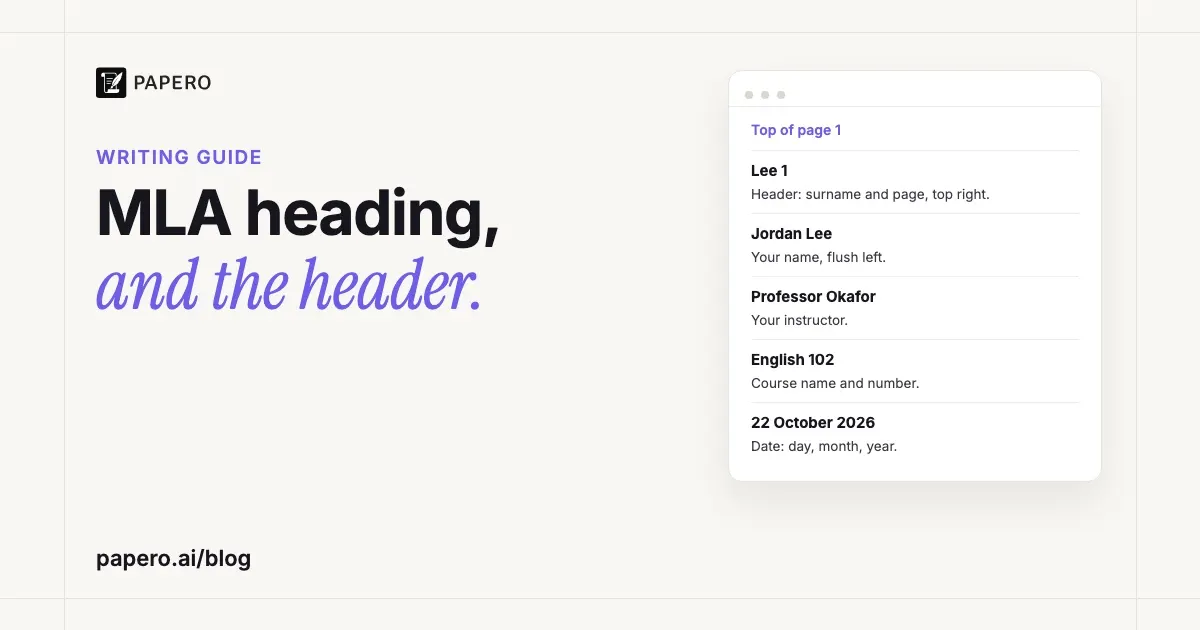
An MLA heading is four lines at the top left of the first page: your name, your instructor’s name, the course name and number, and the date, each on its own double-spaced line. The title follows on the next line, centered, in plain title case. Separately, every page carries a header at the top right with your surname and the page number. MLA papers normally have no title page.
Key Takeaways
- Four lines, flush left, double-spaced: name, instructor, course, date. They start one inch from the top of page 1.
- Write the date day, month, year, as MLA’s sample paper does: 22 October 2026.
- The title is centered and in title case. No bold, italics, underlining, quotation marks, all capitals or final period.
- The header is different from the heading: surname, a space and the page number, half an inch from the top, flush right, on every page.
- A title page is normally needed only for group projects or when your instructor asks for one.
MLA heading format at a glance
The heading sits in the body of page 1, not in the page header, and it is double-spaced like the rest of the paper. The MLA Handbook (9th edition, section 1.3) lists the four lines in this order and puts the centered title directly after them, with no extra blank line. The table shows each line with an example.
| Line | What goes on it | Example |
|---|---|---|
| 1 | Your full name | Jordan Lee |
| 2 | Your instructor’s name (all of them, if there are several) | Professor Okafor |
| 3 | The course name and number | English 102 |
| 4 | The date | 22 October 2026 |
| 5 | The title, centered | Social Media and the Spread of Health Misinformation |
Every line uses the same font and size as the paper: the Handbook (section 1.2) asks for an easily readable typeface at 11 to 13 points. Nothing in the heading is bold, and the four lines are flush with the left margin.
MLA heading example
Here is the top of a first page set up in MLA format. A web page cannot show margins or double spacing, so read the spacing from the notes underneath; the name and course are invented for the example.
Lee 1
Jordan Lee
Professor Okafor
English 102
22 October 2026
Social Media and the Spread of Health Misinformation
The first paragraph of the essay starts here, indented half an inch, and runs on at double spacing like every line above it.
“Lee 1” is the running header, top right on every page. The four heading lines start at the one-inch top margin. The title is centered on the line after the date, and the first line of the essay follows on the next double-spaced line, indented half an inch. MLA’s own sample papers are laid out the same way: Rachelle Dumayas’s essay in the 2024 edition of Writing with MLA Style opens with her name, “Professor Hancock”, “English 5” and “8 December 2023”, then the centered title.
If the title mentions another work, italicize only that work’s title, as you would in your sentences. The rest of the title stays in regular type, as in two of the Handbook’s own examples:
- Concepts of Justice in To Kill a Mockingbird
- The Use of the Words Fair and Foul in Shakespeare’s Macbeth
What is the difference between an MLA heading and a header?
The heading is the four-line block of identifying details at the top of page 1, typed in the body of the document. The header, which the MLA Handbook calls the running head, is your surname and the page number at the top right of every page, placed in the word processor’s header area so it repeats automatically.
The Handbook is loose with the two words itself: section 1.3 calls the four-line block “the header on page 1”, so you will see both terms used for it. The header follows section 1.4 of the Handbook. Number every page consecutively, half an inch from the top and flush with the right margin. Type your surname, a space, then the number: “Lee 1”, never “Lee p. 1”, “Lee - 1” or “Lee 1.” with a period. A one-page paper may not need a page number at all.
People mix the two up in both directions. Typing the four heading lines into the header makes them repeat on every page, which MLA does not want. Typing “Lee 1” into the body means the number never updates. The glossary’s MLA format entry lists the page settings that sit around both: one-inch margins, double spacing throughout and a half-inch paragraph indent.
How do you write the date in an MLA heading?
Write it day, month, year, with the month spelled out: 22 October 2026. The Handbook’s rule for the heading says only “the date”, so the day-month-year order comes from MLA’s own sample paper, which writes 8 December 2023.
Day-month-year is also the tidier choice: the American month-first form, October 22, 2026, needs a comma between the day and the year. Day-month-year needs none, which keeps the line clean. Works-cited entries also put the day before the month, so the pattern may look familiar; our guide to the MLA Works Cited page shows it in every example.
Does an MLA paper need a title page?
Usually not. The MLA Handbook says a research paper does not normally need a title page; the four-line heading on page 1 replaces it. There are two exceptions: a group project, and an instructor who asks for one. A group project’s title page lists every author; an instructor’s title page follows their instructions, and they may want it instead of the four-line heading or in addition to it.
For a group project, the Handbook asks you to make a title page and list every author on it, instead of putting all the names in the heading on page 1. The running header changes too: if all the authors’ surnames do not fit at the top of the page, include only the page number.
When an instructor’s format sheet differs from the Handbook, follow the sheet. The Handbook itself opens its formatting chapter by saying that acceptable variations exist and that writers should follow their instructor, school or publisher when asked to use different guidelines.
How do you set up an MLA heading and header in Word and Google Docs?
Type the four heading lines and the title as ordinary double-spaced paragraphs at the top of page 1, then add the header once through the page-number tool. In Word, insert a plain page number at the top right of the page, click just before the number and type your surname and a space. Every page then shows “Lee 1”, “Lee 2” and so on.
In Word: on the Insert tab, choose Page Number, then a top-of-page position with the number aligned right. With the header still open, put the cursor before the number and type your surname followed by a space. Make sure the header text uses the same font and size as the paper, and that “Different First Page” is off, because MLA numbers page 1 too. Press Esc or choose Close Header and Footer when you are done.
In Google Docs: choose Insert > Page elements > Page number and pick the position at the top right. Click into the header, put the cursor before the number and type your surname and a space. In the header options, leave “Different first page” unticked.
The heading lines: set the whole document to double spacing with no extra space before or after paragraphs, and make sure the four lines have no first-line indent. Only the essay’s paragraphs start half an inch in. Center the title with the alignment button rather than with spaces or tabs, so it stays centered if you edit it.
Do MLA papers use section headings?
They can, but short essays generally do not need them. The MLA Handbook (section 1.5) treats headings inside the paper as optional and warns against using them to patch over a weak structure. When a longer paper does use them, keep them short, flush left and styled the same way at each level, and capitalize them like titles.
The Handbook’s other rules for internal headings:
- No single instance. If you use a level 1 heading, use at least two. The exceptions are the paper’s title and the headings for notes and the Works Cited list.
- Generally no numbers or letters, unless your discipline uses them.
- Show rank with type style, such as bold or a larger size for higher levels and italics or no bold for lower ones. Avoid all capitals.
- Leave a line space above and below each section heading.
That last rule is a real difference from APA, which tells you not to add blank lines around headings and sets the format of each level. If you write in both styles, our guide to APA headings sets out APA’s five levels side by side.
The Handbook also asks for parallel wording at each level: “Understanding Digital Literacy” sits well beside “Learning about Online Research”, while “Can Online Sources Be Plagiarized?” breaks the pattern.
Common mistakes on an MLA first page
Most errors come from formatting the title like a heading in another style, or from treating the heading as a header. Both are easy to miss on screen because the page still looks tidy. Check the title, the spacing, the header and the page number before you submit:
- A bold, underlined or quoted title. The Handbook rules out all three, plus italics and all capitals for the title as a whole.
- Extra space around the heading block. The heading, title and first paragraph all run on at double spacing, with no added blank lines.
- The heading in the page header. It belongs in the body of page 1 only.
- “p.” or a hyphen before the page number, or a period after it.
Leave the period off the title and every heading, including “Works Cited”. To see this first page followed by the rest of a paper, our MLA format example lays out a complete sample essay with every part annotated.
Where Papero fits
Papero is an AI writing workspace for students and researchers. It plans an essay from an outline with a prompt for each section, finds real sources to cite as you write, and formats citations in nine styles, including MLA 9.
When your document uses MLA 9 and you export it to Word in the double-spaced manuscript layout, Papero sets up the first page for you. Fill in your name, instructor and course in the export dialog, and the file opens with the lines you entered (a blank field is skipped) and the date, flush left, then your title, centered in plain type. With page numbers on, the dialog’s default, the header on every page shows your surname and the page number, taken from the last word of your name; with several names in the field, it shows the page number alone. Section headings stay flush left with a line of space around them, and when the paper cites sources, Works Cited starts a new page, centered and not bold. The layout uses double spacing and a half-inch first-line indent, with 12-point Times New Roman and one-inch margins unless you change the font, size or margins in page setup; the dialog picks US Letter or A4 from your browser’s language region.
Because Papero writes the heading, leave it out of your document so it does not appear twice. If your instructor asks for a title page, switch it on in the dialog: the four-line heading is then left out, and the title page carries your title in plain type, then the name, institution, course and instructor you enter (each only when filled in) and the date. Type your due date in the dialog’s Date field; a blank field prints the day you export.
For the citations inside the paper, see our guide to MLA in-text citation. Our essay writing page shows how drafting works while the argument stays yours, and you can sign up free.
Frequently Asked Questions
What goes in an MLA heading?
Four items, each on its own double-spaced line at the top left of the first page: your name, your instructor’s name, the course name and number, and the date in day-month-year order. The paper’s title comes next, centered on the following line, in title case and without bold or italics.
Is the MLA heading double-spaced?
Yes. The four heading lines, the title and the essay itself are all double-spaced, with no extra blank lines between them. The MLA Handbook asks for double spacing across the whole paper, including quotations, notes and the Works Cited list, so the heading follows the same rule.
Does the heading repeat on every page in MLA format?
No. The four-line heading appears only at the top of the first page. What repeats on every page is the header: your surname and the page number, half an inch from the top at the right margin. Set the header up once in your word processor and it numbers each page automatically.
How do you do an MLA heading for a group project?
Make a title page that lists every author, instead of putting all the names in the heading on page 1. That is the MLA Handbook’s instruction for papers with several authors. In the running header, include all the surnames before the page number if they fit; if they do not fit, use the page number alone.
Is the title bold in MLA format?
No. The MLA Handbook says not to bold, italicize, underline or put your title in quotation marks, and not to type it in all capitals. Center it, use title case, and italicize only the title of another work inside it, such as a novel’s name.
Sources
- Modern Language Association, MLA Handbook, 9th edition, sections 1.0, 1.1–1.2, 1.3, 1.4 and 1.5, as published on MLA Handbook Plus (read from Internet Archive copies, October 2026): https://mlahandbookplus.org/books/book/5/chapter/56255/Title
- Modern Language Association, “Sample Essays: Writing with MLA Style” (style.mla.org, accessed October 2026), including Rachelle Dumayas, “Should Deaf Children Get Cochlear Implants?” (2024 edition): https://style.mla.org/sample-papers/
- Microsoft Support, “Insert page numbers” (support.microsoft.com, accessed October 2026): https://support.microsoft.com/en-us/office/insert-page-numbers-9f366518-0500-4b45-903d-987d3827c007
- Google Docs Editors Help, “Use headers, footers, page numbers & footnotes” (support.google.com, accessed October 2026): https://support.google.com/docs/answer/86629