In this lesson you will
- Find out what your university or journal asks you to declare
- Insert a statement and fill in what you used AI for
- Check the statement against how you worked
An AI use statement says which tool you used, what you used it for and that you take responsibility for the text. Check your institution's rules first, because they differ. In Papero, open Insert and choose AI use statement, then replace the text in square brackets with what you used it for.
Say what you did, no more and no less
A good statement is specific. "I used AI" tells a reader nothing. "I used Papero to suggest an outline and to rephrase two paragraphs in the discussion" tells them what to weigh.
Declare only what is true. If you did not check every citation, do not say you did. If a tool drafted a section that you then rewrote, say so. The statement is yours, and you answer for it.
Rules differ between universities, departments and journals. Some want the statement in the methods section, some in the acknowledgements, some in a cover letter, and some ask for the prompts you used. Read the guidance you were given before you write.
Lines to copy
- Outline and suggestionssuggesting an outline and offering sentence suggestions, which I edited
- Rewritingrephrasing passages I had written, to make them shorter and clearer
- Draftingdrafting first versions of the background section, which I rewrote and checked against the cited sources
- Checkingfinding sentences that needed a citation and proofreading the final text
In Papero
Set it up in Papero
Works on Free. The statement is always inserted in English: translate it yourself if your document is in another language.
- Put your cursor where the statement should go.
- In the toolbar, open Insert and choose AI use statement. You can also type / in the page and choose it from the list.
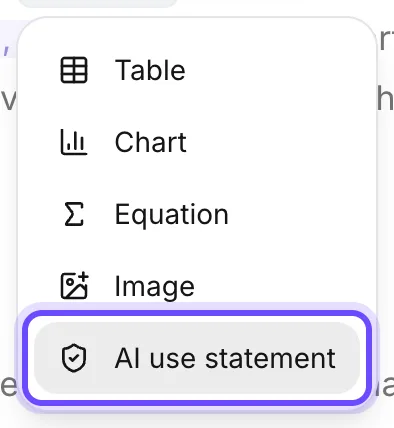
- Select the text in square brackets, including the brackets, and type what you used Papero for.
- Read the whole statement and change anything that does not match how you worked.
- Move it to the place your institution asks for. It is ordinary text.
Practice
Your task
- Find and read your course or journal guidance on AI use.
- Insert the statement and fill in the bracket.
- Add anything the guidance asks for, such as other tools you used.
You are done when the statement has no brackets left, names every AI tool you used and sits where your guidance asks for it.
Common mistakes
- Leaving the bracket inA statement with "[say what for]" still in it shows that nobody read it.
- Claiming checks you did not doOnly write that you verified every citation if you did. Lessons 15 to 17 are how you get there.
- Naming one tool when you used threeIf you also used a chatbot or a grammar checker, the statement should say so.
Key points
- Tool, purpose, responsibility.
- Specific beats general.
- Your institution's rules decide where it goes and how much detail it needs.
Up next · Lesson 20 of 20 · 7 min
Format your paper and export it to Word
A Word file in the layout you were asked for
Mark as done and continueYou marked this lesson as done.