In this lesson you will
- Tell a claim that needs a source from one that does not
- Run the Claims check on one section or the whole paper
- Cite, reword or remove each claim it finds
A sentence needs a citation when it states a fact, a figure or an idea that is not your own and not common knowledge. To find the ones you missed in Papero, open the Review tab, open More checks and press Check claims. The first claims on its list usually come with papers you can cite on the spot.
What needs a citation
Cite a sentence when it gives a number, reports what a study found, or repeats someone else's argument or definition. "Around a third of sampled fish had ingested plastic particles" needs a source. So does "studies show", every time.
You do not cite your own results, your own argument or what every reader in your field knows. "Rivers carry plastic to the sea" needs no source in an environmental science paper. If you are unsure, cite.
For each uncited claim you have three honest choices. Cite a paper that supports it. Reword it as your own view ("this suggests", "I argue"). Or remove it. Adding any paper that sounds right is not one of the three.
Lines to copy
- Needs a citationMicroplastics have been found in most of the freshwater fish species sampled so far.
- Reworded as your own viewThese findings suggest that juvenile fish may be more exposed than adults, which this study tests.
- Common knowledge, no citationPlastic breaks down slowly in water.
In Papero
Set it up in Papero
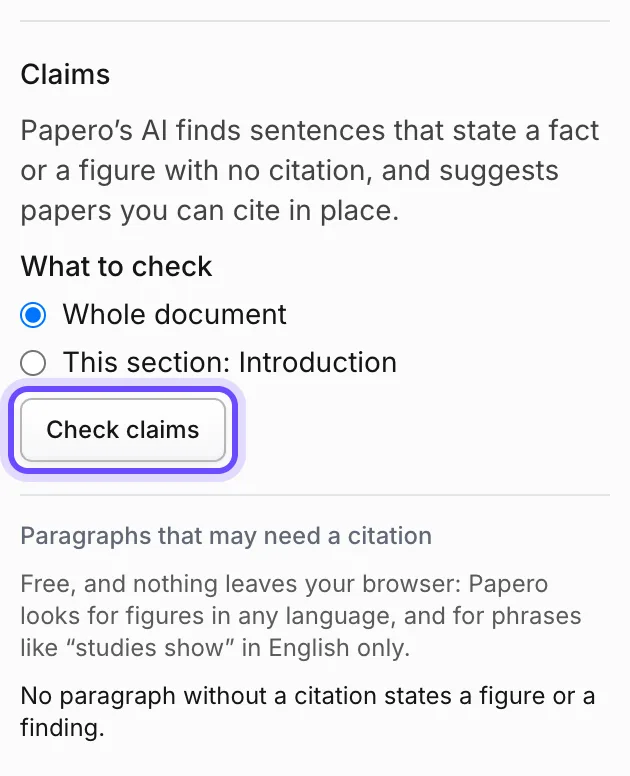
Works on Free. Each check uses one review from your monthly allowance. The list Paragraphs that may need a citation costs no review.
- Open your document and press Side panel at the top right, then the Review tab.
- Open More checks and find Claims.
- To check one section, put your cursor in it and choose This section: under What to check. Otherwise keep the whole document.
- Press Check claims.
- Read each claim. It shows No citation or Weak support, and the first ones on the list usually have papers under them. For a claim with no papers, search yourself with Cite.
- Open a paper that looks right and read its abstract. If it supports the sentence, press Cite on it.
- Under Claims, read Paragraphs that may need a citation and press Show to jump to each one.
Practice
Your task
- Run the Claims check on a section you drafted.
- For each claim, cite a paper you have opened, reword the sentence as your own view, or remove it.
- Read the list Paragraphs that may need a citation under Claims, which costs no review, and deal with what is left.
You are done when every claim the check found is cited, reworded or removed, and you opened every paper you cited.
Common mistakes
- Citing the first paper offeredThe papers under a claim are candidates. Read the abstract before you press Cite.
- Citing common knowledgeA citation on every sentence makes the paper harder to read and hides which sources matter.
- Leaving "studies show" in placeName the studies or drop the phrase. A reader cannot check a study you did not name.
Key points
- Facts, figures and other people's ideas need a source.
- Cite it, reword it as yours, or remove it.
- A suggested paper is a candidate until you have read it.
Up next · Lesson 16 of 20 · 5 min
Check your sources for retracted papers and preprints
No retracted paper in your reference list
Mark as done and continueYou marked this lesson as done.